Guide: Save Facebook Videos via FastDown
Want to save Facebook videos to your gallery in high-end 1080P, 2K, or 4K resolution? Many online tools fail to preserve the original audio or crisp visuals. FastDown.app solves this by offering a premium, browser-based solution to grab any Facebook content instantly without requiring extra plugins or software installs.
Outstanding Advantages of FastDown.app
Beyond standard video downloads, our downloader offers versatile features:
- High-quality Facebook Reels Downloader
- Easily download private videos and content from closed groups
- High-quality Facebook to MP3 converter, perfect for any use case.
- Powerful server system with broad bandwidth, ensuring processing and downloading in seconds.
- Free and Unlimited: All features on FastDown are free, with no hidden fees or paid subscriptions required.
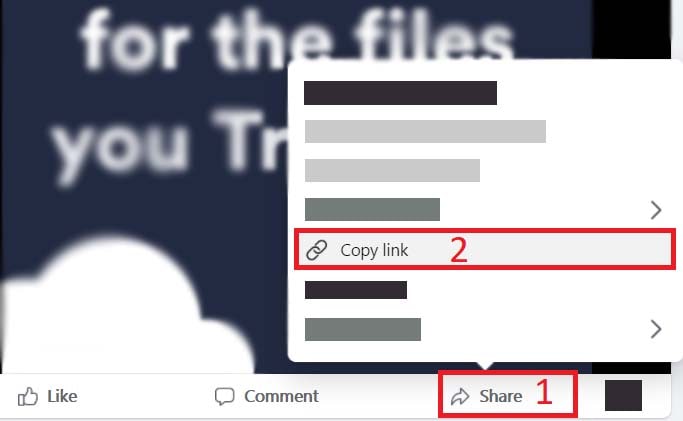
Step 1: Copy the Facebook video URL
Open the Facebook app or website. Navigate to your desired video → Click Share → Choose Copy link.
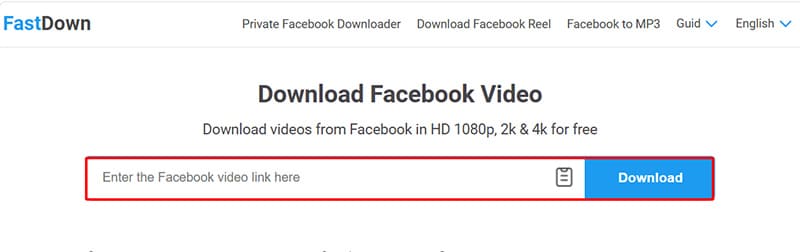
Step 2: Launch FastDown.app
Head to https://fastdown.app/en via your browser. Insert the link into the search box at the top → Press Download.
Step 3: Save video to device
- Pick your preferred file type: MP4 for the full video, or MP3 if you only need the sound.
- Choose quality level: SD, 720p, 1080p, HD+, up to 4K.
- Click Render if merging audio and video is required (specifically for HD+ content).
- Wait just a few moments for the system to process; your file will be ready for download!
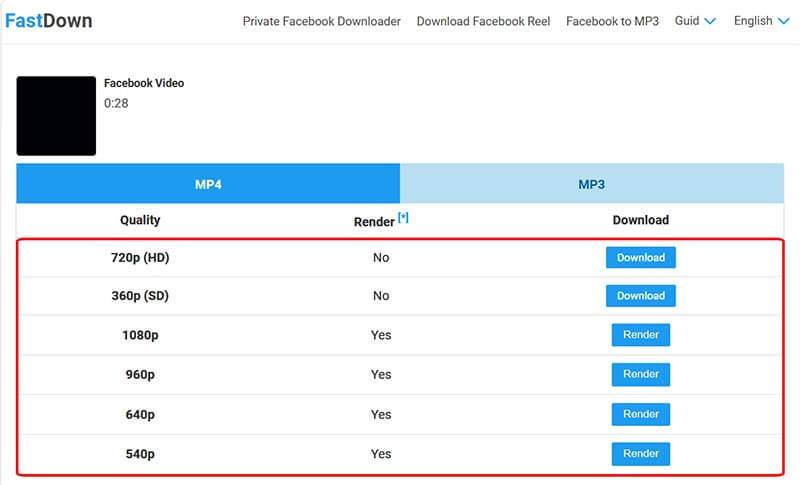
Note for high-quality videos (HD+, 2K, 4K): Facebook often stores video and audio tracks separately. FastDown will automatically merge them into a single file for you, which may require a few moments to complete.