Download Private Facebook Videos
Best tool to download Facebook videos from closed and secret groups online
How to download private Facebook videos or from closed groups?
Looking to download videos from Facebook private groups, secret groups, or geo-restricted content? Since these videos cannot be downloaded normally, FastDown has developed a specialized tool that uses manual page source extraction. While this method is more complex than usual, it is the only solution for saving these videos. Simply log in to Facebook on your browser, copy the post's source code, and paste it into FastDown; our tool will extract the links for you to download the video in the best quality.
Key Features of our Private Downloader
- Download private videos in the highest quality: HD, 1080p, 2K, 4K.
- Easily convert to MP3 with just one click, no software installation required.
- Support saving private videos from secret groups, fanpages, restricted videos, or those that cannot be downloaded normally.
- Completely free; the entire process is performed directly on your web browser without installing any software or apps.
Note: Using a desktop browser is highly recommended for easier source code copying and pasting, ensuring a much higher success rate.
Step 1: Open your browser → Access Facebook.com → Locate the private video → Click on its timestamp to view it on a standalone page.

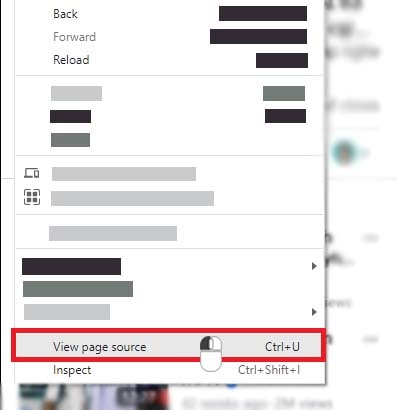
Step 2: View page source code. Windows users: Press [Ctrl + U]. Mac users: Press [⌘ + Option + U].
OR
Right-click anywhere on the page → choose View page source from the menu.
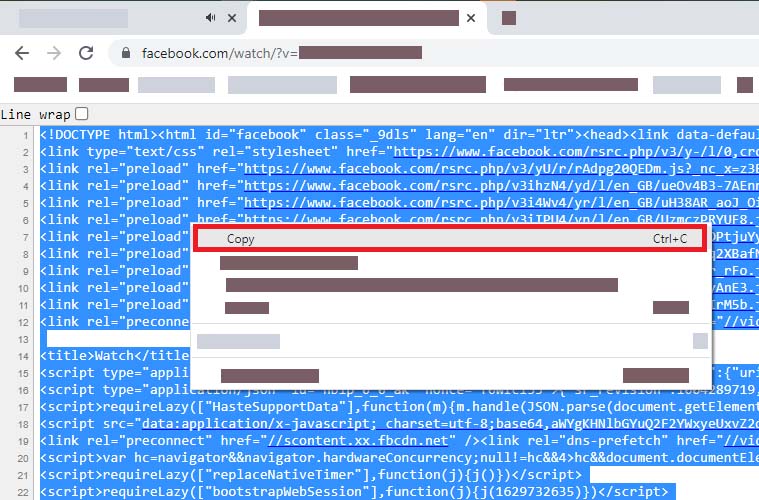
Step 3: Select all content by pressing Ctrl + A (or ⌘ + A). Right-click and choose Copy.
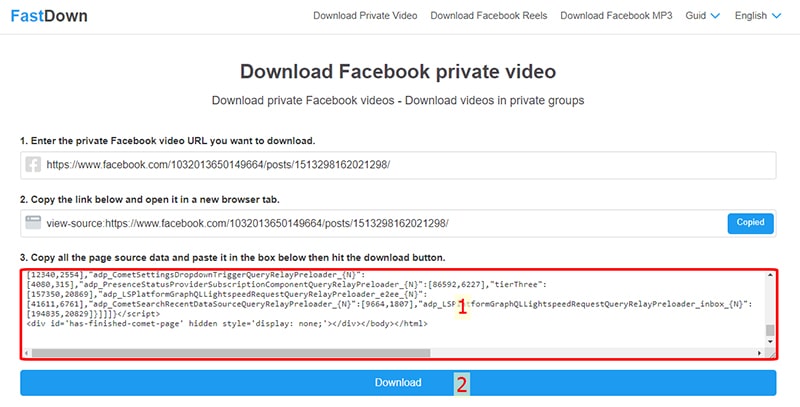
Step 4: Return to FastDown.app, paste the source code into input box #3, and click Download.
Step 5: Pick MP4 for video or MP3 for audio → click Download and wait for processing to complete before saving the file.
Important notes when using our Private Downloader:
- You must be a member of the group or have permission to view the video to extract the post source code.
- FastDown currently does not support downloading videos from Live streaming sessions while they are still in progress.
- Our tool is cross-platform compatible, but we highly recommend using a desktop computer for a more stable experience and to guarantee the highest success rate.